Folleto de novedades - Versión 28: Novedades de WINDEV
See the 928 new features (PDF)
Benefit from the 196 common new features of version 28 in WINDEV
WINDEV benefits from the 196 common new features in version 28, particularly: improved editors, custom shortcuts, higher speeds, new controls, improved PDF control, Markdown support, the new Polar Area chart, new features in the SCM, report editor, WLanguage and OOP, and more.
The Kanban control: indispensable in WINDEV
The new Kanban control is a great addition to your WINDEV applications.
Kanban controls can be used to organize a process, monitor a project, distribute tasks, etc.
This native control handles all user actions.
Create a Kanban board in a few minutes with this new control!
3 new Smart controls provided in WINDEV 28
Smart controls save valuable time during the UI creation process, and immediately make your applications more sophisticated. 3 new Smart controls (common to WINDEV, WEBDEV and WINDEV Mobile) are introduced in version 28: - Multi-selection with tokens.
- Badge.
- Address autocomplete.
Remember: Smart controls are delivered with their source code, so they can be fully modified and customized.
New Smart control: token entry with list
The "Multi-selection with tokens" Smart control allows you to select one or more tokens from the list.
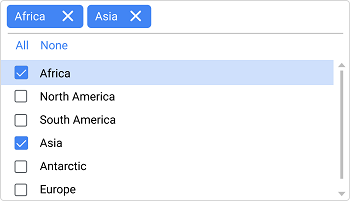 Multiple selection with tokens
New Smart control: badge display
The "Badge" Smart control shows a badge (small circle with a number) on a given control. A badge draws attention to a counter: number of pending orders, etc.. The chip displaying the number can be positioned on any type of field: button, label, image, etc....
 Here, the badge (red circle with the number) appears on a Button control
New Smart control: address completion
The "Address autocomplete" Smart control suggests addresses as you type. A list of addresses is displayed. Please bear in mind that this control is based on a Google API. Google may require you to pay a subscription fee, depending on the number of requests.
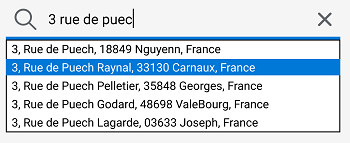 Several address suggestions appear when the end user starts typing
Image columns: improved presentation
The presentation of Image columns has been improved in version 28: by default, a margin is present around the image, making the table more harmonious..
WLanguage on Table field: miscellaneous
- The BuildBrowsingTable function now allows you to dynamically create columns to view data from a data file. Now, columns of type Memo show the size of the Memo file.
- A new syntax of the TableSort function takes parameters of type String. This syntax allows you to easily restore the sort order retrieved with the TableSortedColumn function.
Markdown: field labels, column headers, menu options, tooltips, etc.
 You can now format all the text in your applications With Markdown support in version 28, you can customize the format of all the text in a control. This allows you to easily enrich the UI in your applications.  Easy formatting with Markdown Because of its simplicity, Markdown text is easy to translate. Markdown text automatically adapts to the style of the control, most notably to the dark theme.
Undockable tabs: optimizations
Floating tab panes allow end users to freely position tabs and customize their UI.
In version 28, a much smoother animation appears when moving these tab panes.
Pictos and tab labels: margins!
Now you can set margins for tab icons and texts. The layout improves automatically.
 In edit mode, you can see the margins that have been applied around the icons  A clean layout at runtime:
no more icons touching the borders!
Button field: frame customization
A Button field can contain frames, whose appearance can vary depending on the state of the button: pressed, hovered, etc.,... In version 28, you can define the border settings for each state in the "Style" tab of the 7-tab window.
 Easily select the type of border for each state
Image Editor control
With the Image Editor control, you can include a full-blown image editor in your applications without writing a single line of code. In version 28, this control benefits from new features: - Animated GIFs
- A new event is proposed in the code editor: "After OCR", which allows you to retrieve the text and carry out the desired processing.
- A new button allows you to scan and automatically retrieve the image
- An AI transforms freehand drawings into the corresponding object: line, rectangle, circle...
Buttons with free icon positioning
If a button contains an icon with free positioning, you have the ability to specify the coordinates.
You can now choose how the icon's content is displayed: framed, homothetic...
Scientific input mask
A new mask for Numerical edit controls: scientific notation.
For example, you can get the following syntax without third-party tools: 1,23E+10.
2 new skin templates for WINDEV
Two new skin templates are introduced in version 28: Eleven and Touch.
This allows for new customization possibilities.
Menu field: new separator with label
A menu can contain one or more separators. In version 28, this separator can contain a text.
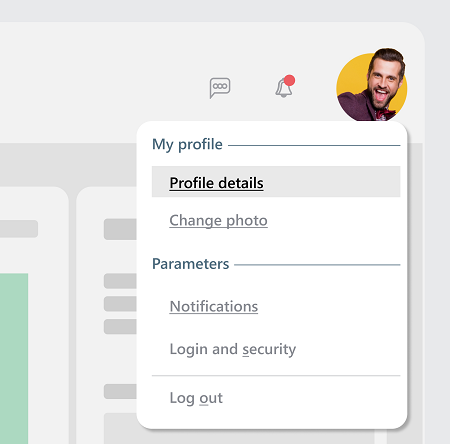 The menu separator can now include text
Menu field: visual options
You can define "5-state" icons (e.g. buttons) in the menu options via the-7 tab window or programmatically.
 5-state icon
Combo Box control: rounded frames, netted frames, custom hover banner
In version 28, the expanded area of a Combo Box can be customized: - border
- hover bar
- row height
- ...This allows you to create modern, sleek Combo Box controls.
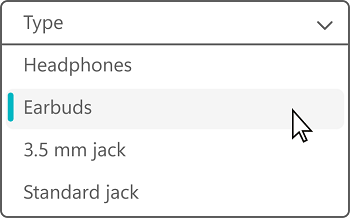 A clean Combo Box...
Static Text control: rotated display
Static Text controls can now be rotated. This rotation is specified in the "Style" tab of the 7-tab window.
 Rotated text (in red)
Edit control: new event for input assistance
The Edit control has an autocomplete feature available to the end user.
In version 28, the "Select a value in the list of input suggestions" event allows the application to determine which suggestion was selected by the end user.
This new feature allows you to assign a different value to the Edit control than the one displayed in the Help window: for example, an acronym,...
Export help to PDF
As you know, in WINDEV you can generate a help file for the end user.
It can be an HTML or PDF file.
The PDF version now allows navigation through automatically generated links.
Revamped setup program
The auto-generated setup program of your WINDEV applications looks better than ever! The interface has been revised, and a modern style has been applied for a more user-friendly feel.
Install: notification of available updates while the application is running
You can set an automatic toast message to let the user know that an update is available, if the application is in use. The toast message gives the user two options: - perform the update immediately,
- get a reminder next time they start the application.
 This toast message lets the user know when an update is available.
It appears when the application is running, at the bottom right of the screen
Install: miscellaneous
- Active filters are preserved in the Push installation administrator when the list of computers is refreshed.
Combine 2 existing applications: Desktop application and website
By integrating a website into a window in a desktop application, you can share existing elements and boost productivity.
Integrate a WEBDEV page into a WINDEV window
WINDEV's new "WEBDEV Page" control allows you to integrate a website into a WINDEV application, and to interact with this site programmatically. Simply specify the URL of the page to insert. The window that contains the control interacts with the page via browser procedures. These procedures are accessible in the WINDEV code editor and benefit from code completion.
Interaction: the window calls page procedures
The WEBDEV page procedures that can be called from a WINDEV window must be declared in a shared interface. These procedures can make AJAX calls to the server. Code sample: Code in the WEBDEV page
implements Interface_containing_accessible_methods_of_the_page
uses Interface_containing_the_available_callbacks_from_page_to_window
MyHostControl.ACallback()
Code in the WINDEV window
uses Interface_containing_accessible_methods_of_the_page
implements Interface_containing_the_available_callbacks_from_page_to_window
WEBDEV_Page_control.Page.APageProcedure()
Interaction: the page calls window procedures
The WINDEV procedures that can be called from the WEBDEV page must be declared in a shared interface. This interface generates a configuration file. This configuration file must be provided to the WEBDEV environment, which will then allow you to natively call the procedures. You will be able to call the window procedures directly from the code of the Browser procedures of the page.
New layout available for the WEBDEV page
A web page can contain menus, an ad banner, style controls, a footer with the legal notice... This information may no longer be useful when the page is integrated into a WINDEV application. To solve this, a new type of layout specific to the WINDEV and WINDEV Mobile integration is now available in WEBDEV. This layout allows you to avoid displaying certain information.
Safety: first level
The page and the window must exchange data in a secure way. First of all, by default, WEBDEV page navigation is limited to the URL domain provided in the application: this eliminates XSS (Cross-Site Scripting) attacks. If the WEBDEV page contains sensitive data, there are several methods to secure access to the page: - Setting up an authentication method with Windows session login credentials (Single sign-on (SSO))
- Requesting site login credentials at the start of the session and storing the encrypted login information in memory
- Requesting site login credentials every time the user tries to access the page, etc.
This information is then sent through a secure HTTPS URL.
Safety: second level
You can implement additional security features. Two-factor authentication, with a code sent via email, for example. IP address-based restriction can also be easily implemented.
Seamlessly webify existing resources
Many new development projects are intended for the Web. However, most existing projects consist of Windows applications. Integrating a website into a WINDEV window is a major step to preserve and webify a company's software assets without sacrificing functionality. This allows for rapid, agile, risk-free, step-by-step progress.
Common new features
WINDEV's environment benefits from the common new features in version 28.
In particular: Modern UI, live data for images in the 7-tab window, new control sizing handles, snap-on feature using the keyboard, new style selection window, etc.
Miscellaneous
- When creating a project, the 64-bit mode and the use of Unicode strings are enabled by default.
- The "buffer security check" mode is enabled for 64 bit-executables.
A host of new features
WINDEV's window editor benefits from common new features: keyboard object snapping, more ergonomic field handles, new style editing window, customizable shortcuts, etc.
Format painter
In version 28, copying a style from one field to another becomes very simple: the style copy brush is active in the style sheet editor.
Context menu for fields: it's more efficient
The context menus of the window and page editors have been completely revised for a better experience.
UI error: new errors reported
- If a table does not support per-pixel scrolling, the editor shows an error and prompts you to fix it with one click.
- Context menu: if 2 menu options have the same value (defined in the 7 tabs), a UI error is generated.
- If a window opened with Info, YesNo, or similar functions is not customized, a UI error appears. A customized window is more user-friendly because it allows the use of AIFs: timers...
Move towards a modern, well-spaced UI design language
In version 28, new editor functions enable existing UIs to be automatically modified to meet today's requirements: spacing and enlargement.
Enlarge the font and the host control
Current UIs tend to use larger fonts in the different controls. In version 28, the font size of all the controls in a window can be automatically increased. This avoids having to change the skin template and resize controls one by one. When the font is resized, all the controls are automatically enlarged and moved to preserve the current layout. The window itself is also enlarged.
Spacing of controls
Another current design trend is to increase spacing between the controls in a window. A new feature analyzes the spacing between controls in an existing window, and shifts the coordinates of each control using a given factor, expressed as a percentage. For example, 20% spacing shifts the controls by 20%. The window will also be resized using the same factor.
Windows 11 skin template
WINDEV 28 includes a skin template that follows the main Windows 11 UI design guidelines.
Use this skin template to obtain a Windows 11 layout immediately.
See new feature 212.
Touch-friendly skin template
WINDEV 28 includes a specific skin template for touch-friendly UIs.
This skin template adapts all clickable zones: large buttons, large combo arrows, large switches/pickers, input zones, etc....
For example, this skin template can be used to easily create interactive kiosks, restaurant kiosks, interactive screens for the real estate industry...
See new feature 212.
RAD: RAD analysis info
The Analysis Editor lets you specify information for the ARD for each item: type of field to be generated, field content, general field properties, etc....
The RAD will use this information to generate windows and pages.
Version 28 differentiates this information by platform: PC, Web, Mobile.
Grant rights to upload applications
In version 28, the Supervisor can authorize one or more users to upload applications to the Store.
End user: seamless transition from historical Network install to Private Store install
Today, in many organizations, applications are installed via a setup file on the network.
When an application already deployed via the network becomes available on the Private Store, end users do not need to download the application again.
The application will automatically switch to the Store's Live Update system for future updates.
Name setup files
In version 28, you can rename the setup files of applications available on the Private Store.
End user: installation instructions
For security reasons, Internet browsers prevent executables from automatically running on the PC.
The steps to run an executable may be different depending on the browser.
The Private Store download page now shows a step-by-step guide for the corresponding browser.
Check "all/no" in the switch columns: now it's automatic
In tables with check box columns, an option appears automatically in the table header. End users can use this check box to select or clear all the check boxes in the column.
Homonymic copy
In version 28, homonymic copy (<=) works in Java on advanced types: Chrono, FichierDisque, Couleur, ...
9 New JAVA functions
WLanguage offers 9 new functions for Java.
LINUX: ExecutePresetAction
The code editor provides predefined actions for button clicks: open a window, send an e-mail, cut, copy, paste, etc.,... In version 28, the ExecutePresetAction function becomes available.
LINUX: miscellaneous
The 64-bit execution mode becomes the standard. The 32-bit mode is not supported in version 28. To use this mode, compile your application in version 27 (accessible from version 28).
58 New functions, 30 new Linux constants for WINDEV
WLanguage offers 58 new functions and 30 new constants (seen online help) for Linux.
.NET 6 support
Good news for developers who use assemblies: .NET6 is now supported.
Using assembly: choosing which version of the dotNet framework to use
There are more and more versions of the .NET framework.
Now you can specify the framework version to be used in a WINDEV project that uses .NET assemblies.
If this version is not available on the user's computer, an error is displayed.
Assembly generation: choosing the .NET framework to target
A WINDEV project generating DotNet assemblies can specify the framework version to be used when using these assemblies: version 5 or version 6.
Common new features
The language is the cornerstone of the development.
In version 28, WLanguage in WINDEV is further enriched.
It benefits from common new features and a number of useful evolutions: AI-based edge detection, new type of undetectable chain, addition of appointments, straightening an image in perspective, evolution of introspection, automatic OCR on zone, etc., ...
See new features 114 to 147.
33 new constants
33 new constants are available in WLanguage in version 28: | | | | orgDateTimeFirstVisible | charsetUnicode | charsetUTF16BE | | charsetUTF16LE | charsetUTF32 | diagActionNone | | diagActionAll | diagModeFreehandDrawing | diagModeSelection | | aafPrintDiagram | aafPvtCollapseAll | dfMarkdown | | dfRTF | dfPlainText | frelSubdirectoryOnly | | ftpProxySOCKS5 | grPolarArea | h4G | | h5G | hPrimaryKey | hCloud | | iListOutput | iMarkdown | maskBitcoin | | maskScientific | useModeOCR | socketConfigureMode | | tsWaiting | typKanban | typKanbanList | | wlProjectElement | wlDataFile | wlUntyped |
19 new types
19 new types of variables are available in WLanguage:
8 new properties
8 new WLanguage properties are available for WINDEV.
13 new functions for the DiskFile type
WLanguage offers 13 new functions for the DiskFile type.
80 new WLanguage functions for WINDEV
80 new WLanguage functions are available for WINDEV in version 28:
| | | Exporte un champ Kanban vers une variable de type Image. | | Dessine un champ dans une image. | | AIDetectContour | Detecta los contornos de las formas en una imagen. | | AIDetectDrawing | Clasifica los dibujos a mano alzada, incluidos círculos, cuadrados y triángulos. | | Belgium.CheckCBE | Comprueba la validez de un número CBE belga (Crossroads Bank for Enterprises). | | Belgium.CheckEU | Comprueba la validez de un número EU (número de unidad de establecimiento para identificar empresas en Bélgica). | | Belgium.CheckNISS | Comprueba la validez de un número NISS (número de seguridad social en Bélgica). | | BitcoinValidAddress | Comprueba si la dirección de un monedero Bitcoin es válida. | | Brazil.CheckCNPJ | Comprueba la validez de un número CNPJ (número de identificación de empresa en Brasil). | | Brazil.CheckCPF | Comprueba la validez de un número CPF (número de identificación fiscal en Brasil). | | Canada.CheckBN15 | Comprueba la validez de un número BN15 (número de empresa canadiense de 15 dígitos). | | Canada.CheckBN9 | Comprueba la validez de un número BN9 (número de empresa canadiense de 9 dígitos). | | Canada.CheckSIN | Comprueba la validez de un número SIN (número de seguridad social canadiense). | | CapitalizeEachWord | Pone en mayúsculas la primera letra de todas las palabras de una cadena. | | ComponentExecute | Ejecuta un procedimiento global presente en un componente externo. Este componente externo se carga con ComponentLoad. | | DiagramSearch | Busca formas que contengan un texto específico en un diagrama. | | dModifyContrast | Cambia el contraste de una imagen: - en un control Imagen,
- en una variable de tipo Image.
| | DocFindElementByName | Busca un elemento por su nombre en un documento de un procesador de texto. | | DocPositionTopPage | Devuelve la posición del primer carácter de una página determinada en un control Procesamiento de texto. | | dStraighten | Transforma una imagen aplicando una corrección de perspectiva. | | dTextMarkdown | Dibuja texto Markdown:- en un control Imagen,
- en una variable de tipo Image,
- en una variable de tipo WDPic (en la capa de fondo),
- en una variable de tipo picLayer.
| | EmulateDnD | Emula la acción de "arrastrar y soltar" en las pruebas automatizadas. | | ExecuteFunction | Ejecuta una función WLanguage identificada por su nombre. | | ExecuteMainThreadAsynchronous | Ejecuta un procedimiento en el subproceso principal de la aplicación sin esperar a que termine de ejecutarse. | | fBuildRelativePath | Devuelve la ruta relativa a un archivo con respecto a un directorio de referencia. | | fChangeExtension | Cambia la extensión de un archivo en el disco. | | fMIMEType | Devuelve el tipo de archivo según el estándar MIME (Multipurpose Internet Mail Extensions). | | France.CheckINSEE | Prueba la validez de un número INSEE (número de identificación de personas físicas asignado por el Instituto Nacional de Estadística y Estudios Económicos). | | France.CheckSIREN | Comprueba la validez de un número de SIREN francés (Système d'Identification du Répertoire des Entreprises). | | France.CheckSIRET | Comprueba la validez de un número de SIRET francés (Système d'Identification du Répertoire des Etablissements). | | GenerateGeometricImage | Genera una imagen con formas geométricas de forma aleatoria. Esta imagen puede utilizarse para rellenar temporalmente un control Imagen, por ejemplo. | | Germany.CheckIdNr | Comprueba la validez de un número IdNr (número de identificación fiscal en Alemania). | | Germany.CheckUStIdNr | Comprueba la validez de un número USt-IdNr (número de identificación de empresa en Alemania). | | HDropView | Elimina una vista materializada del servidor HFSQL. | | HTMLToPDF | Convierte una cadena o buffer HTML en un buffer que contiene un documento PDF. | | IBANValid | Comprueba la validez de un número IBAN (número de cuenta bancaria internacional). | | iPrintAreaMarkdown | Imprime texto Markdown en un área rectangular. | | Italy.CheckCF | Comprueba la validez de un número de CF (código fiscal italiano). | | Italy.CheckIVA | Comprueba la validez de un número de IVA (número de identificación de empresa en Italia). | | JSONValid | Comprueba la validez de una cadena JSON. | | KanbanAddCard | Agrega una tarjeta a una lista en un control Kanban. | | KanbanAddList | Agrega una nueva lista a un control Kanban. | | KanbanCount | Devuelve el número de tarjetas o listas en un control Kanban. | | KanbanDeleteAllCard | Elimina todas las tarjetas de un control Kanban o de un control Lista Kanban. | | KanbanDeleteCard | Elimina una tarjeta de un control Kanban o de un control Lista Kanban. | | KanbanDeleteList | Elimina una lista de un control Kanban. | | KanbanInfoXY | Devuelve una de las siguientes opciones para una posición determinada (coordenadas de un punto) en un control Kanban:- el número de la tarjeta que se encuentra en la posición especificada,
- el número de la lista que se encuentra en la posición especificada
| | KanbanMoveCard | Mueve una tarjeta en un control Kanban. | | KanbanPositionList | Permite desplazarse por la lista de un control Kanban para mostrar una tarjeta específica. | | MarkdownToDOCX | Convierte una cadena Markdown en un archivo DOCX. | | MarkdownToHTML | Convierte una cadena Markwdown en un buffer HTML (codificado en UTF-8). | | MarkdownToPDF | Convierte una cadena (o buffer) Markdown en un buffer que contiene un documento PDF. | | MarkdownToText | Convierte una cadena Markdown en texto sin formato (sin etiquetas). | | ModbusSendRawFrame | Envía una trama completa a un suscriptor Modbus. Esto permite la comunicación con dispositivos que no cumplen estrictamente con el protocolo Modbus. | | MongoExecuteOperations | Realiza operaciones de escritura en MongoDB de forma masiva. Esto evita los problemas de latencia de red que podrían producirse si se realizan las operaciones de forma secuencial. | | OpenAPIToHTTP | Construye la solicitud HTTP para llamar a la función de una API. Luego, podrá ser enviada utilizando la función HTTPSend. | | PDFReaderGoToBookmark | Establece la posición directamente en el marcador deseado en el documento PDF. | | PicRectangularSnip | Captura un área rectangular con el cursor y almacena la imagen en una variable de tipo Image. | | PicRectangularSnipOCR | Ejecuta el OCR y extrae el texto de un área rectangular definida con el ratón. | | RoundToMultiple | Devuelve un valor numérico redondeado al múltiplo más cercano de otro valor numérico. | | SCPGetFile | Obtiene un archivo mediante el protocolo de copia segura. | | SCPSendFile | Transfiere archivos mediante el protocolo de copia segura (SCP). | | SocketConfigure | Configura el uso de las funciones Socket. | | Spain.CheckDNI | Comprueba la validez de un número de DNI (número de documento nacional de identidad en España). | | Spain.CheckNIF | Comprueba la validez del NIF (número de identificación fiscal en España). | | SpreadsheetUnmergeCell | Anula la combinación de la celda especificada o seleccionada en un control Hoja de cálculo. | | Switzerland.CheckBER | Comprueba la validez de un número BER (número de identificación en el registro de empresas en Suiza). | | Switzerland.CheckOASI | Comprueba la validez de un número OASI (número de pensión pública en Suiza). | | Switzerland.CheckUID | Comprueba la validez de un número UID (número de identificación de empresa en Suiza). | | UnitedStates.CheckEIN | Comprueba la validez de un número EIN (número de identificación del empleador en Estados Unidos). | | UnitedStates.CheckFEI | Comprueba la validez de un número FEI (identificador de establecimiento estadounidense). | | UnitedStates.CheckSSN | Comprueba la validez de un número SSN (Número de seguro social estadounidense). | | UTFConvert | Convierte una cadena o un búfer al formato especificado: UTF, ANSI, Unicode. |
|
|
|